Showing posts with label video. Show all posts

May 27, 2014

HOW TO CREATE YOUR OWN BUSINESS VIDEOS WITH A PANASONIC GH3

A still from a video
We live in a visual world. Video makes a big impression. You can make nice recordings with your smartphone or a basic camcorder but are they good enough for business today? Let’s look at how you can create your own quality videos in full high definition (1080p).

The Equipment

For the best results, get the right equipment and learn how to use it. I did lots of research and also talked to video expert Nikola Danaylov of the terrific Singularity Weblog.

A DSLR camera works well most are optimized for photography. They have annoying limitations. For example, with the Nikon D5300
“Recording times are relatively limited, unfortunately, with only a 10 minute maximum recording time for High movie quality at 1080/60p (this increases to 20 minutes at Normal quality setting). ” — Imaging Resource
Camera
Consider a Panasonic GH3, a mirrorless camera optimized for video (review). You get
  • a separate record button for video
  • unlimited recording times (subject to the space on your memory card)
  • full HD (1080/60p) at hard-to-match bit rates as high as 72 Mbps
The GH3 is easy enough for a beginner and capable enough for a professional. Since the GH4 with 4K resolution is now available, the GH3 is an even better bargain. You might be able to find a used one. Use the savings on other equipment.
Lens
The lens is very important. You may change cameras but can keep using the same lens (unless you change systems).

The Panasonic HX025 Leica DG Summilux lens, 25mm/F1.4 ASPH is an excellent choice. The lens is a 50mm equivalent (review). That’s roughly what the human eye sees. There are two potential drawbacks
  • no optical image stabilization: not an issue since you’ll be using a tripod
  • no zooming: not an issue since you’ll move the camera closer, which also helps with sound quality
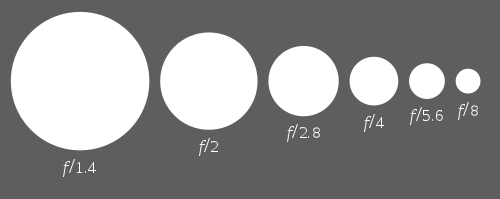
Comparing aperture sizes (click for article on Wikipedia)The lens aperture is f1.4, which allows lots of light gets in. That lets you get great results in situations with lower lighting. You also get a shallow depth of field: the background is out of focus, which puts attention on the foreground. You’ll see this used in movies and commercial photography.
Other
You’ll need a tripod designed for video. When you’re working in a controlled environment like an office, you needn’t spend extra for a lightweight tripod or even the latest model. I picked up a discontinued tripod from a camera clearance outlet.

As you gain experience, you may want to get an external microphone. A shotgun mic is a good choice (e.g., the Rode VideoMic Pro). Another option is a wireless clip-on lavalier mic (e.g., the Sennheiser EW 112P G3). To get more sophisticated, get a second camera and more lens!

The Editing

Editing is easier if you have good video, good audio and few mistakes. There are many editing tools. I’ve used Adobe Premiere Elements but don’t find it intuitive enough. I switched to Cyberlink PowerDirector. You’ll find good choices at TopTenReviews. Using the trial version will help you decide.

The Publishing

YouTube is an ideal place (e.g., my channel). Your video editor may even do the upload automatically.

The Result

Here’s a short video recorded in my office in a single take. The frame rate is a cinematic 24 frames per second and the light is from a window. The script took several days to finalize and memorize. This is not the first take.

What do you think?

Links

PS The GH3 also takes great photos.

December 17, 2013

10 TIPS FOR USING A WEBCAM FOR BUSINESS

Logitech c920 webcam on tripodWe live in a visual world. Mastering your webcam is important and growing more important. You can use your webcam for video calls (Skype, Google Hangouts) and making videos.

I've been reluctant to use my webcam because I haven't liked the setup in my office. I've been working on that. Here's what I've learned. The steps are in order.

1. Put the webcam at eye level

You probably have your notebook computer on your desk low enough for typing. That’s too low for video. You risk showing more neck than face, which may not be flattering. Mind those nose hairs too!
How do you get your webcam to the right height?

If looks don’t matter, the easy way is to put something underneath your computer like a box or stacks of printer paper. You’ll want to make sure your stand is stable. If you plan on typing, an external keyboard and mouse help (and are worth having anyway).

It’s now easier to pretend you’re talking to a real person.

2. Look Directly At The Webcam

Your webcam is likely above your screen. It’s tempting to look at the screen whether you’re recording or Skyping. That means you’re looking below the webcam. This is less than ideal but less of a problem once your webcam is at eye level.

When you’re having an in-person conversation, you don’t look at the other person the whole time. You’re allowed to blink and shift your gaze. If you’re also taking notes, you’ll need to do this. You can do this when using a webcam too.

3. Have lots of light

Webcams work in low lighting but not very well. You’ll see a similar effect when taking photos with your smartphone. The apertures which let in light are much smaller than with a camera. This means you need more light.

Since the best lighting simulates daylight, why not use natural light? I face a large window in my office. That provides excellent light during the day. If you want more control and consistency, you can use artificial lights. I've been experimenting by putting lights I already have near the window. That means I can record with the lighting coming from the same general area.

If you want to get fancy, you’ll find lots of lighting options available.

4. Heed the background

What's behind you makes a big difference. What does your webcam see? You want to make sure that nothing confidential shows. You also want to create a good impression. Doors aren’t especially appealing on camera. What if someone enters the room?

If your office is messy, can you keep a portion tidy?

5. Dress appropriately

Video cameras see differently than we do. They seem to like blue but not stripes. You’ll find more details at Videomaker and Real Men Real Style.
You don’t want to look too formal or too casual. When recording video, you might want to  wear the same things every time, for consistency and branding. I haven’t figured out what to wear.

6. Get an external webcam

Built-in webcams have improved but don’t have the quality of an external webcam. They can’t match the flexibility either.

An external webcam that mounts on a tripod gives you flexibility. You also get quality since only the high-end models offer this connection (e.g., my Logitech C920 or the  Microsoft LifeCam Studio). You don’t need a fancy tripod since you won’t need to make many adjustments besides height and placement.

7. Stand up

When you put your webcam on a tripod, you don't need to sit down. When you stand, you still want the camera at eye-level. When you stand, the mess in your office is less likely to show. Clever huh?
Standing give you more energy. I tend to stand even when making phone calls and make notes on my whiteboard.

whiteboard on webcam8. Be creative

You don't have to use your webcam like the masses. What's a good style for you? Standing can help set you apart. Having a practical (but real) backdrop can too. I have a nice oak whiteboard. That lets me write and gives me an incentive to keep the whiteboard clean.

I’ve setup my webcam on a tripod facing the whiteboard, close enough to show what's on the board without zooming. The wide angle of the camera, shows me too. I am at the left of the whiteboard, which is ideal because we read from left to right. In my case, the lighting comes from my right hand side too.

9. Get a good microphone

The microphones in webcams aren’t very good. They'll do when you’re starting out but you'll get much better results with an external USB microphone. I've been using a Samson C30U with a shock mount and stand since 2009. There are probably better models now but I've had no reason to upgrade. Get quality and you’re set for years.

You simply set up your computer to use video from the webcam and audio from the USB microphone.

10. Get better video editing software

Basic video editing is easy if you have a good quality recording. You might want to trim the beginning or end, and perhaps add titles. As you get more experienced, you may find the video editing software that came with your webcam or computer isn’t adequate. There are lots of options for upgrading. I’ve used Adobe Premiere Elements and switched to Cyerlink PowerDirector.

You don't have to do everything at once. Start by getting a webcam that mounts on a tripod. Next get a tripod and finally get a USB microphone.

Links

PS Items go on sale.

April 9, 2013

ONE BILLION REASONS TO CREATE YOUR OWN VIDEOS

YouTube's growth (click for full size)YouTube started in February 2005 (exactly two years before this blog) and already has one billion unique viewers each month. That’s 1,000,000,000.

Where are your videos?

There are lots of reasons to create video. Let's assume you agree. You don’t need to hire anyone. You can create your own.

Better Than Professional

You won't get the same look as a professional. You probably won’t use fancy green screens or specialized lighting. Instead, you’ll be authentic. That’s valuable and costs less.

A key reason to shoot your own video is the sheer flexibility. You don't need to worry about scheduling. You can do take after take. You can shoot more video and more often. You’ll get better with practice.

Equipment

To get started, you need a video camera, a tripod, video editing software, a computer, and an external hard drive. You may need lighting. For now, let's assume you use natural lighting.

The camera can be relatively basic. These days you can even shoot good video with a smartphone. You'll have trouble mounting one on a tripod though. Consider a “basic” video camera. You can upgrade later if you want.

You might even start with the webcam in your computer or tablet.

Stage fright

Appearing on camera is daunting. Practice helps. Try using your smartphone with a free app like Viddy which lets you record and post 15 second clips. Maybe you can get someone else do the recording for you. Here are my examples.

You need not appear at all. You can add a voiceover to a presentation from within PowerPoint (Microsoft explains how). A high quality external microphone USB is a worthwhile investment since audio quality is very important.

Video audiences keep growing, thanks to mobile devices. You’re losing opportunities if they can't find you.

Links

PS There may be times to hire a professional. By practicing, you save time (and money) when using their services.

October 2, 2012

BUILDING TRUST WITH LINKEDIN: YOUR 30 DAY ACTION PLAN

LinkedIn 30 day action planAt the end of 2011, I said I was sick of social media and planned to write about other topics instead. I've lapsed occasionally because I keep getting requests for help. I recently spoke to advisors at an Advocis Peel Halton event on Social Media and Branding.

I spoke about building trust with LinkedIn and presented this 30 day action plan with three segments:
  1. Your past experience
  2. Your ongoing generosity
  3. Your current relevance
You can do everything yourself but may get better results with help.

Past Experience

Your past experience helps establish your credentials from studying and work experience.

Credible testimonials are the best way to show that you had the skill to do what you did. You especially want testimonials from clients. You can also get them from colleagues and others but these are not as relevant to potential clients. Action: Get three or more testimonials. 

Your LinkedIn Profile tells the world about you. An incomplete or poorly completed Profile says you don’t care. How does that bring you clients? LinkedIn guides you through the process of building your Profile. You can make changes gradually and make revisions later if you're not happy. Pay particular attention to your Summary. This is your infomercial. Use the first person ("I") and write the way you talk. The rest can use third person. Make your content simple to understand. Big words and long sentences rarely impress. Action: Complete your Profile to 100%.

Ongoing Generosity

Giving changes you and invokes reciprocity, the #1 universal principle of influence . Giving valuable information online costs you nothing but adds to your digital tapestry and creates a stronger first impression on visitors.

Action: Give at least five testimonials. If you won't go on the record to say nice things about others, how can you expect to get testimonials? Do not give/get testimonials from the same people. If you recommend me and I recommend you, we both lose credibility. A reader can easily think we're biased and ignore both of us. Doubt grows very easily and is tough to erase.

Giving testimonials is also a nice way to nudge or remind others to give you testimonials. You’re leading by your virtuous deeds.

Since a testimonial is static, you need signs of ongoing generosity too. To say up-to-date, you probably read information regularly. Some of the content will be relevant to your LinkedIn connections. Action: Post two or more updates every week. Posting an update takes mere minutes. Because updates take very little effort, nothing magical happens. If you’re consistent, your connections start noticing you. If your updates are useful, they start paying more attention to them (and you).

Current Relevance

Just because you have solid past experience and post updates doesn’t show that you can do the work today. Times change. Have you updated your skills? You may be an expert in Blackberries but that’s less relevant when Android and iOS rule.

To show that your brain still works, answer questions. Action: Participate in Groups. Avoid Groups loaded with your competitors. They are not going to buy from you. Focus on the Groups your clients visit. By participating, you’ll start to become known. Your answers get seen by people who aren’t even your connections. Maybe they will want to hire you or connect with you.

Creating original content changes you from a parrot to a pundit. Creating content like blog a post is time consuming. Within LinkedIn, there’s a hybrid solution. When you post a link to show ongoing generosity, also add content to show your thinking. You’ve got lots of options. Maybe you supplement the article, point out weaknesses or interpret. Action: Create original content.

Presentation

Here’s my full live presentation.
You can also get the slide deck and other resources.

Links

PS Every step in the action plan is free.

March 13, 2012

LIQUID LUNCH: REASONS TO GET INTERVIEWED ON INTERNET TV

Promod Sharma live on Liquid LunchThis is the year of video as a marketing priority. I just had my first interview on camera. This was on Liquid Lunch, an Internet show.

There are advantages over regular TV, especially for a beginner:
  • longer interviews (about 20 minutes)
  • more relaxing: like a living room, not a studio
  • less intimidating: "normal" hosts, not TV newscasters

Leveraging

You can buy the recording of your segment for re-use. That's probably the business model. There are several options. I got the raw footage since I'm learning to edit. You can see the results for yourself.

The Studio

The studio is just south of the Toronto bus terminal at Bay/Dundas. The building has character. I walked up four flights of stairs to the large open-concept facilities. One corner has the recording studio with a green screen to allow fake backgrounds.

There are lots of video cameras — at least four. These aren't the big ones you might find on a movie set or in a TV studio. These looked like the ones you might buy for yourself. The cameras were set to different spots and angles. There were no camera operators but there were three technicians. Two sat behind the controls. They applied the backgrounds and did the magic of live broadcasting.

To my surprise, the audience wasn't ordered to stay silent during the recording. We were but the microphones seem oblivious to distant sounds.

Hosts

The hosts are the key to a great interview. If you feel comfortable, you'll come across better. Two hosts are better than one. Hugh Reilly and Sandra Kyrzakos were excellent. They had rapport and seemed like nice genuine people. There were no off-camera tantrums about having too few red Smarties. In fact, I saw no Smarties at all. If there were any, they'd already eaten them.

I was concerned about how to sit. Sandra suggested I make myself comfortable while still able to speak. I followed her advice and didn't pay attention to my body. I sat back in my chair and crossed my legs at the ankles. .

Improvement Ideas

Liquid Lunch broadcasts at 480p, which is not very crisp by today’s standards. An upgrade to 720p or 1080p would be better. Maybe the lower resolution is an advantage since no one applies make-up to guests?

The sound quality could be improved too. The background hiss is noticeable and distracting. We’ll watch poor video with crisp sound but not crisp video with poor sound. Before publishing, I applied noise reduction to my clip and switched to 720p. This improved the sound but couldn’t do much for the video.
Perhaps upgrades are on the way.

Videos Of You

Have you seen those video bios where people describe what they do in a couple of minutes? The results often look choppy and unnatural. It’s as if the clips came from an assembly line using a standard formula and fill-in-the-blank scripts. Next, please. Reading from a teleprompter doesn’t help since we don't know how.
What’s the alternative?

You could get interviewed instead. There's much less for you to do. You're bound to look natural because you’re chatting with friendly interviewers who are on your side. When you focus on them, you won’t notice the cameras. You’ll also get much more usable footage.

If you're in the Toronto area and have something to say, you can apply to appear on Liquid Lunch. The experience is worthwhile.

Links

PS Prepare a list of potential interview questions and your answers. This list wasn't used but helped me think of what I wanted to say. That's a blend of impromptu and prepared.