June 4, 2014

TAKE A BREAK FROM READING BOOKS

what are you reading?
When you read, what do you have to show for your efforts?

You might be educated or entertained --- and kept away from TV and Netflix. Regardless of where you get your content, you’re a consumer, part of the audience. If you borrow books from the library or a friend, you may feel pressure to finish.

Sabbatical

I’ve stopped reading books for six months (which in my case means no longer listening to audiobooks while driving). Instead, I’m listening to E Street Radio and comedy on Sirius XM. They’ve given me a free six month trial.

Afterwards, I’ll return to books (generally nonfiction). At the start of my sabbatical, I had mild angst. There are so many books to read and I was falling behind. Within two weeks, I was enjoying the break. Stepping back is refreshing.

Other Sources

Books are time consuming to finish. You’ll find their ideas condensed online in excerpts, reviews, videos or interviews. For instance, if you’ve seen the Start With Why TEDx Talk, you don’t need to read Simon Sinek’s book or see him live. You might want to but you already have the highlights.
You’ll also find related content through your social networks and mainstream media.

A Quota

If you’re an avid reader, another approach is to limit what you’re reading. Rather than racing to read more books, consider getting a deeper understanding of fewer books. Maybe you read or re-read one book per quarter. You now have time to apply what you’re learning.

A Different Use Of Time

Instead of consuming, start creating.

We learn better by explaining to others. Perhaps you publish a mind map, blog post, video. We build character and show consistency by sticking to a schedule. We improve our skills. We also help others.

Links

PS Conversely, if you don’t read regularly, maybe it’s time to start?

May 27, 2014

HOW TO CREATE YOUR OWN BUSINESS VIDEOS WITH A PANASONIC GH3

A still from a video
We live in a visual world. Video makes a big impression. You can make nice recordings with your smartphone or a basic camcorder but are they good enough for business today? Let’s look at how you can create your own quality videos in full high definition (1080p).

The Equipment

For the best results, get the right equipment and learn how to use it. I did lots of research and also talked to video expert Nikola Danaylov of the terrific Singularity Weblog.

A DSLR camera works well most are optimized for photography. They have annoying limitations. For example, with the Nikon D5300
“Recording times are relatively limited, unfortunately, with only a 10 minute maximum recording time for High movie quality at 1080/60p (this increases to 20 minutes at Normal quality setting). ” — Imaging Resource
Camera
Consider a Panasonic GH3, a mirrorless camera optimized for video (review). You get
  • a separate record button for video
  • unlimited recording times (subject to the space on your memory card)
  • full HD (1080/60p) at hard-to-match bit rates as high as 72 Mbps
The GH3 is easy enough for a beginner and capable enough for a professional. Since the GH4 with 4K resolution is now available, the GH3 is an even better bargain. You might be able to find a used one. Use the savings on other equipment.
Lens
The lens is very important. You may change cameras but can keep using the same lens (unless you change systems).

The Panasonic HX025 Leica DG Summilux lens, 25mm/F1.4 ASPH is an excellent choice. The lens is a 50mm equivalent (review). That’s roughly what the human eye sees. There are two potential drawbacks
  • no optical image stabilization: not an issue since you’ll be using a tripod
  • no zooming: not an issue since you’ll move the camera closer, which also helps with sound quality
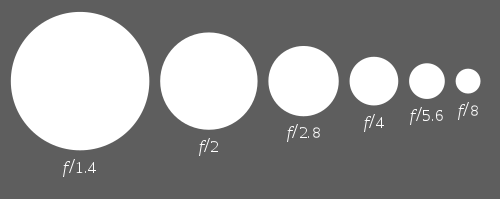
Comparing aperture sizes (click for article on Wikipedia)The lens aperture is f1.4, which allows lots of light gets in. That lets you get great results in situations with lower lighting. You also get a shallow depth of field: the background is out of focus, which puts attention on the foreground. You’ll see this used in movies and commercial photography.
Other
You’ll need a tripod designed for video. When you’re working in a controlled environment like an office, you needn’t spend extra for a lightweight tripod or even the latest model. I picked up a discontinued tripod from a camera clearance outlet.

As you gain experience, you may want to get an external microphone. A shotgun mic is a good choice (e.g., the Rode VideoMic Pro). Another option is a wireless clip-on lavalier mic (e.g., the Sennheiser EW 112P G3). To get more sophisticated, get a second camera and more lens!

The Editing

Editing is easier if you have good video, good audio and few mistakes. There are many editing tools. I’ve used Adobe Premiere Elements but don’t find it intuitive enough. I switched to Cyberlink PowerDirector. You’ll find good choices at TopTenReviews. Using the trial version will help you decide.

The Publishing

YouTube is an ideal place (e.g., my channel). Your video editor may even do the upload automatically.

The Result

Here’s a short video recorded in my office in a single take. The frame rate is a cinematic 24 frames per second and the light is from a window. The script took several days to finalize and memorize. This is not the first take.

What do you think?

Links

PS The GH3 also takes great photos.